

AI Summary
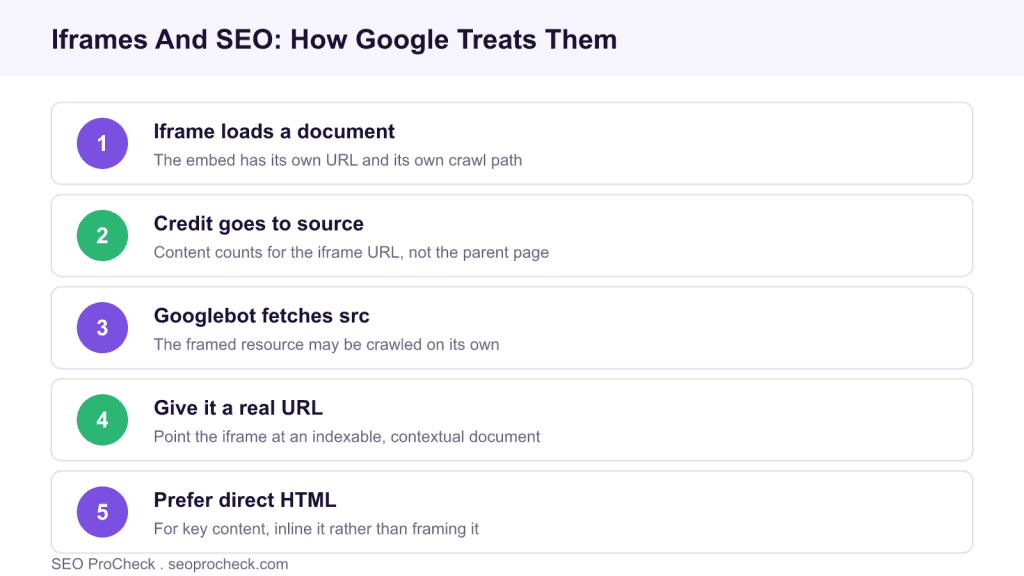
Google treats an iframe as a separate document with its own URL, so framed content is generally credited to that source URL rather than to the page hosting the frame. To keep iframes from hiding important content, give the framed resource a real indexable URL, keep it crawlable, add surrounding context, and use direct HTML for anything that must rank on the parent page.
- An iframe loads a second document that Google crawls and attributes on its own URL.
- Content locked inside an iframe usually does not count for the parent page that frames it.
- Keep the iframe source crawlable, give it a genuine URL, and add context around it.
- For primary content, prefer a server side include or direct HTML over an iframe.
This case study is based on the guidance published by Search Laboratory on iframes and SEO. We keep the original summary and source below, then add practical rules for using iframes without losing indexable content.
This SEO case study documents a successful optimization initiative, providing actionable insights for practitioners. The documented approach demonstrates how strategic SEO implementation drives measurable results.
Initial Situation
Understanding the starting point is essential context for evaluating any case study. This documentation covers the initial challenges, competitive position, and business objectives that shaped the SEO strategy.
Strategy and Approach
The strategic approach combined multiple SEO disciplines to address identified opportunities. Key decisions around prioritization and resource allocation provide a template for similar initiatives.
Implementation
Moving from strategy to execution required specific technical implementations, content development, and process changes. This case study documents the practical steps that translated strategy into action.
Results and Learnings
The outcomes demonstrate effectiveness through measurable improvements in rankings, traffic, and business metrics. Analysis of successes and challenges provides learning value for practitioners.
Case studies like this contribute to the SEO knowledge base, helping practitioners learn from documented real-world experiences.
Source: https://www.searchlaboratory.com/2017/09/iframes-and-seo/
How Google sees an iframe
An iframe embeds an entirely separate HTML document inside your page, and that document has its own URL, its own response and its own crawl path. Googlebot can fetch the framed source independently, and it generally attributes the framed content to that source URL rather than folding it into the parent. The visual result looks like one page to a visitor, but for indexing purposes you are dealing with two documents, which is the root of most iframe SEO confusion.
When iframes cause SEO problems
Trouble starts when your important content lives only inside an iframe. If the parent page needs to rank for that content but the words belong to the framed URL, the parent can look thinner than it is. Problems also appear when the iframe source is blocked in robots.txt, so Googlebot cannot fetch it, or when the framed URL is not itself indexable. Efficient fetching still matters here too, and validation caching on the framed resource, described in whether Googlebot uses ETag headers, helps Google refetch it cheaply.
| Practice | Do | Avoid |
|---|---|---|
| Framed URL | Give it a real, indexable URL | Framing content with no standalone URL |
| Crawlability | Keep the iframe source crawlable | Blocking the src in robots.txt by accident |
| Primary content | Use direct HTML or a server side include | Locking body copy that must rank inside a frame |
| Context | Add a heading, text and a real link near the frame | Leaving the frame with no surrounding signals |
| Performance | Lazy load non critical frames | Loading heavy third party frames eagerly |
Optimise iframes the right way
If you must use an iframe, make the framed document work as a page in its own right: a crawlable, indexable URL with its own title and useful content. Surround the frame on the parent page with a real heading, supporting text and a standard link to the framed URL, so both documents have context and Google can connect them. Add a title attribute for accessibility, and lazy load frames that are not critical so they do not slow the parent. For content that genuinely must rank on the parent page, do not frame it at all, render it directly in the HTML or pull it in server side so the words belong to the page that needs them. The BBC example in goodbye iframes at the BBC shows why teams move key content out of frames, and the rendering questions overlap with whether worker rendered content will index.
What has changed since this guidance
Google has grown better at rendering and can, in some cases, incorporate iframe content into the parent page during indexing, but you cannot rely on it for anything important. The safe assumption is still that framed content belongs to its own URL. Native lazy loading with the loading attribute has made performance easier to manage, and privacy and security headers now shape what can be framed at all. The core advice is unchanged: give the frame a real URL, keep it crawlable, add context, and use direct HTML for content that must rank.
Frequently asked questions
Does content inside an iframe count for my page?
Usually not for the parent page. Google treats the framed document as its own URL and generally credits the content there, so anything that must rank on the parent should be in direct HTML rather than framed.
Will Google index an iframe at all?
Google can crawl and index the framed URL as its own document if that URL is crawlable and indexable. What it does not reliably do is attribute the framed content to the page that hosts the frame.
Should I block iframes in robots.txt?
Only frames you never want fetched. If you block the source of a frame that holds useful content, Googlebot cannot retrieve it, which removes that content from consideration entirely.
How do I make an iframe SEO friendly?
Give the framed resource a real indexable URL, keep it crawlable, add a title attribute, and surround the frame with a heading, supporting text and a normal link so both documents have context.
Are iframes bad for Core Web Vitals?
They can be if heavy third party frames load eagerly. Use native lazy loading for non critical frames and reserve space for them so they do not cause layout shift or block the main content.
When should I avoid iframes for SEO?
Whenever the content must rank on the parent page. In that case render it directly in the HTML or include it server side, so the words belong to the URL that needs to compete in search.
Claude Vincent is a technical SEO consultant focused on crawlability, rendering, and AI-search visibility. He writes the field guides and case studies at SEO ProCheck, with a bias toward the durable, unglamorous work that decides whether search engines and AI answer engines can actually read and cite a site.
About SEO ProCheck
Technical SEO consulting and GEO strategy with 20 years of enterprise experience. Case studies, resources, and tools for search and AI visibility.
Work With Me
Technical SEO audits, GEO strategy, site migrations, and international SEO. Hourly consulting for teams who need hands-on support, not just reports.
Subscribe to our newsletter!







Recent Posts
- Can AI Crawlers Actually Read Your Site? I Measured 400 of the Biggest September 5, 2026
- The Pre-Publish Quality Gate for AI-Assisted Content August 6, 2026
- AGENTS.md vs llms.txt vs llms-full.txt: Which Agent File Does What July 18, 2026