

AI Summary
Content decay is the slow loss of organic traffic, rankings, and conversions from a page that used to perform, even though you never changed the page itself. The world around it moved: facts went stale, competitors shipped deeper answers, or search intent drifted, so the fix is usually a refresh rather than a rewrite.
- Diagnose it in Search Console by comparing the same season year over year with a Page filter applied.
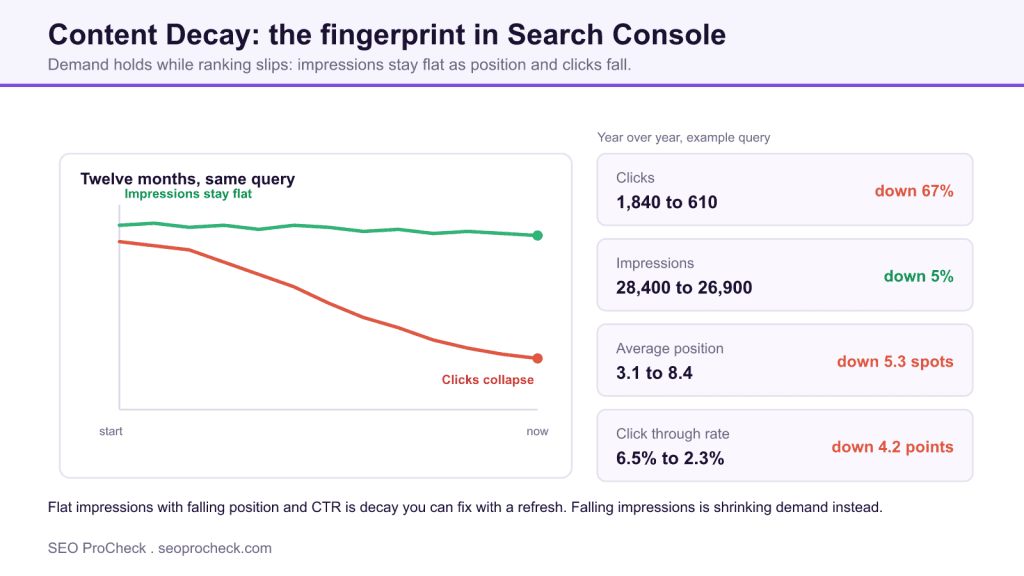
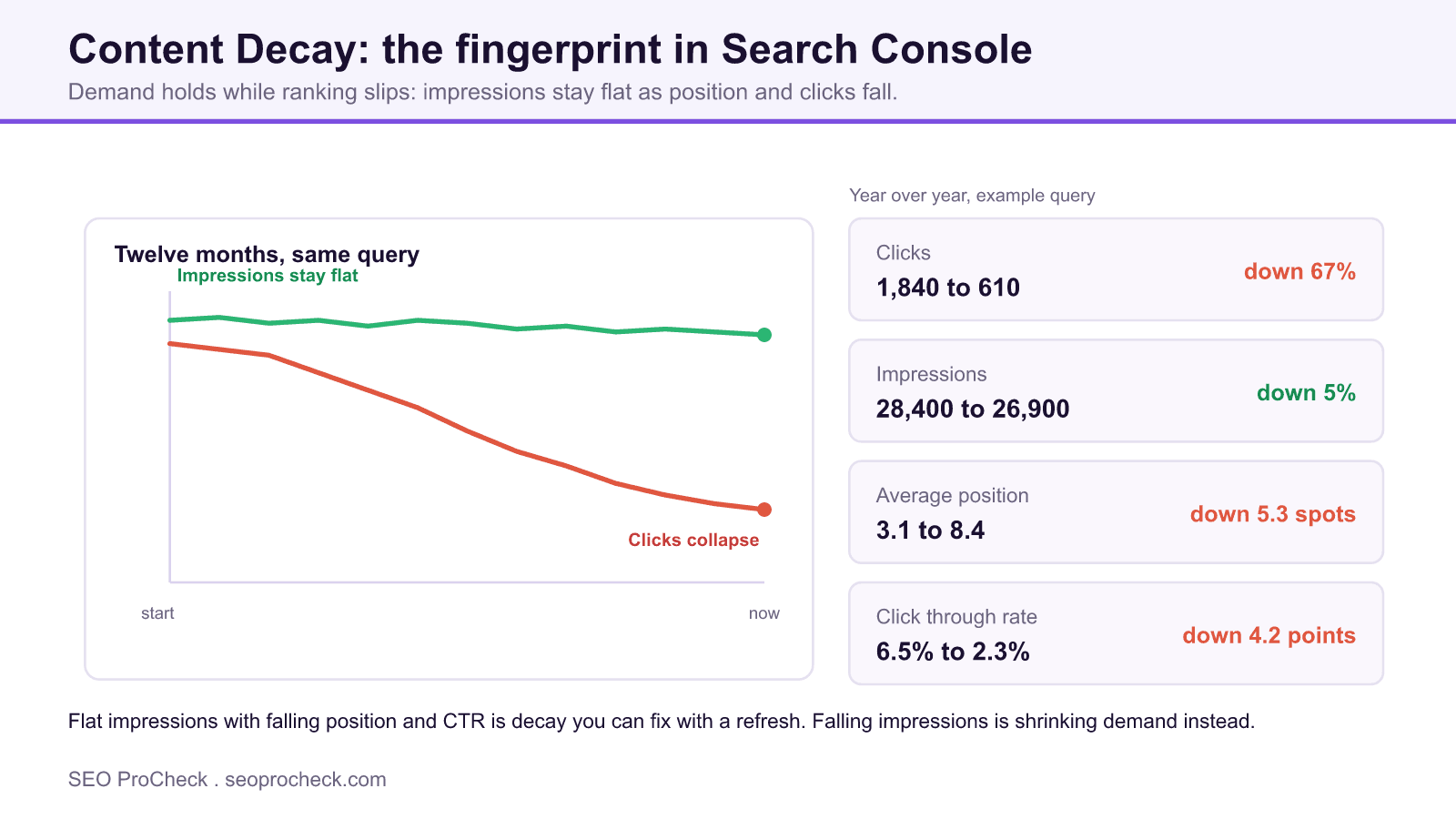
- The decay fingerprint is flat impressions with falling position and CTR; falling impressions means shrinking demand instead.
- Triage by absolute clicks lost against business value, not by percentage drop.
- Refresh or consolidate a decaying page; deleting it throws away the authority that makes recovery cheap.
What content decay actually is
Content decay is the slow bleed of organic traffic, rankings, and conversions from a page that used to perform, even though you never touched the page itself. Nothing broke on your end; the world around the page moved and the page stood still. The stakes are simple: decay is money quietly walking out the door, and because it happens over months, it rarely trips any alarm until a whole cluster of pages has already slid.
It shows up for a handful of reasons that stack on top of each other: the facts on the page went stale, a competitor shipped something deeper, the search intent behind the query drifted, or Google's read of the query changed and your page no longer matches what it now rewards. A page that owned position 2 for two years can be sitting at position 9 today purely because five better answers arrived and yours never got a second look.
A real decay diagnosis in GSC
You can't see decay in a single month of data. You see it by putting two comparable windows side by side. Open Search Console, go to Search results, set the date to Compare, and pick the same season a year apart (year-over-year kills the noise from seasonal swings and algorithm months). Add the Page filter for the URL you're checking, then look at the clicks and average-position deltas.
Here's what a decaying page looks like when you pull it. Same page, same query set, twelve months apart:
| Metric (query: "best budget standing desk") | Prior year | This year | Delta |
|---|---|---|---|
| Clicks | 1,840 | 610 | -67% |
| Impressions | 28,400 | 26,900 | -5% |
| Average position | 3.1 | 8.4 | -5.3 |
| CTR | 6.5% | 2.3% | -4.2 pts |
Read that carefully. Impressions barely moved, so demand for the topic is fine. Position fell off a cliff and CTR collapsed with it. That's the fingerprint of decay: the market still wants the answer, Google just stopped picking yours. Contrast that with a page where impressions themselves cratered, which points to shrinking demand or a de-indexed topic, not decay. The fix for the table above is almost always a content refresh, not a rewrite from scratch, because the page already earned its authority.
Decay severity at a glance
Not every dip is worth your afternoon. Sort your decaying pages by how much traffic they lost and how much they still earn, then triage:
| Pattern | Clicks YoY | Position YoY | Likely cause | First move |
|---|---|---|---|---|
| Slow slide | -20% to -40% | Down 1-3 spots | Stale facts, aging examples | Refresh facts, dates, screenshots |
| Cliff drop | -50%+ | Down 4+ spots | Better competitor or intent shift | Re-audit SERP, rebuild angle |
| Flat clicks, falling CTR | ~0% | Stable | SERP feature ate your click | Target the snippet or PAA box |
| Impressions and clicks both gone | -70%+ | Off page 1 | Demand dried up or cannibalization | Check consolidation, then reconsider topic |
That last row is the one people misread. When two of your own URLs chase the same query, they trade positions and split clicks, and the aggregate looks like decay. It isn't. That's a mapping problem, and the fix lives in keyword mapping and consolidation, not another refresh.
How to check it on your own site
- In Search Console, open Search results and switch the date picker to Compare. Choose the same 3-month window this year versus last year.
- Export the Pages tab for both periods, or use the built-in comparison and sort by the clicks difference column ascending, so your biggest losers float to the top.
- For each top loser, add a Page filter and read the four numbers together: clicks, impressions, position, CTR. The combination tells you the cause, not any single metric.
- Confirm demand is still there by checking impressions and by glancing at the live SERP. If real people still search it and you've fallen, it's decay worth fixing.
- Sort your confirmed decayers by remaining clicks times business value. Fix the pages that still earn real money first, then work down.
- Log a baseline (date, position, clicks) before you change anything, so you can prove the recovery in the next YoY pull.
Common mistakes and how to fix them
- Reading a single month and calling it decay. One bad month is weather, not climate. Fix: always compare year-over-year or at minimum a rolling 6-month trend before you act.
- Treating a CTR problem as a ranking problem. If position held but clicks fell, a SERP feature or a competitor's better title is stealing the click. Fix: rewrite the title and description, or go after the featured snippet, before you touch the body.
- Deleting the page. A decaying page still carries links and history. Fix: refresh or consolidate it. Pruning a page that Google already trusts throws away the exact asset that makes recovery cheap.
- Fixing the smallest losses first. Recovering a page from 40 to 55 clicks feels productive and moves nothing. Fix: triage by absolute clicks lost against business value, not by percentage.
- Refreshing without a baseline. If you don't record where the page stood, you can't tell your boss (or yourself) whether the refresh worked. Fix: screenshot the GSC numbers and note the date before every edit.
FAQ
It varies wildly by topic. News-adjacent and "best tool for X" pages can start slipping within months because the ground shifts constantly. Evergreen how-to content might hold for two or three years before competitors and stale examples catch up. The trigger is external change, not a fixed clock, so monitor trends rather than waiting for a calendar date.
No. A penalty or a core-update hit tends to move many pages at once, sharply, on a datable day. Decay is gradual, page-by-page, and driven by staleness and competition rather than a manual or algorithmic action. If your whole site dropped overnight, look at update dates and manual actions first; if individual pages slid over quarters, that's decay.
If the page still has demand and unique standing, refresh it. If it overlaps another URL and they're cannibalizing each other, consolidate. Leave it alone only when the topic itself has genuinely died and no one searches it anymore. See content refresh and content consolidation to decide.
Absolutely, and it's the sneakiest case. Sitewide growth from new pages can mask individual pages quietly rotting underneath. Always audit at the page level, not just the property level, or your winners will hide your losers.
Read them together. Steady impressions with falling position and CTR means the demand is intact and you lost the ranking battle, which is fixable decay. Falling impressions means the demand itself shrank, which is a different problem that no refresh will solve.
Take this with you
The assistant links open with a question about this page already written.
Claude Vincent is a technical SEO consultant focused on crawlability, rendering, and AI-search visibility. He writes the field guides and case studies at SEO ProCheck, with a bias toward the durable, unglamorous work that decides whether search engines and AI answer engines can actually read and cite a site.
About SEO ProCheck
Technical SEO consulting and GEO strategy with 20 years of enterprise experience. Case studies, resources, and tools for search and AI visibility.
Work With Me
Technical SEO audits, GEO strategy, site migrations, and international SEO. Hourly consulting for teams who need hands-on support, not just reports.
Subscribe to our newsletter!








Recent Posts
- Google August 2026 Spam Update: Dates, Duration and How to Read Your Data November 2, 2026
- Google Algorithm Updates: The Dated List Since 2003, and What to Do After Each October 31, 2026
- AI Readiness: The Checklist, the Research and the Free Tools October 28, 2026