

TL;DR
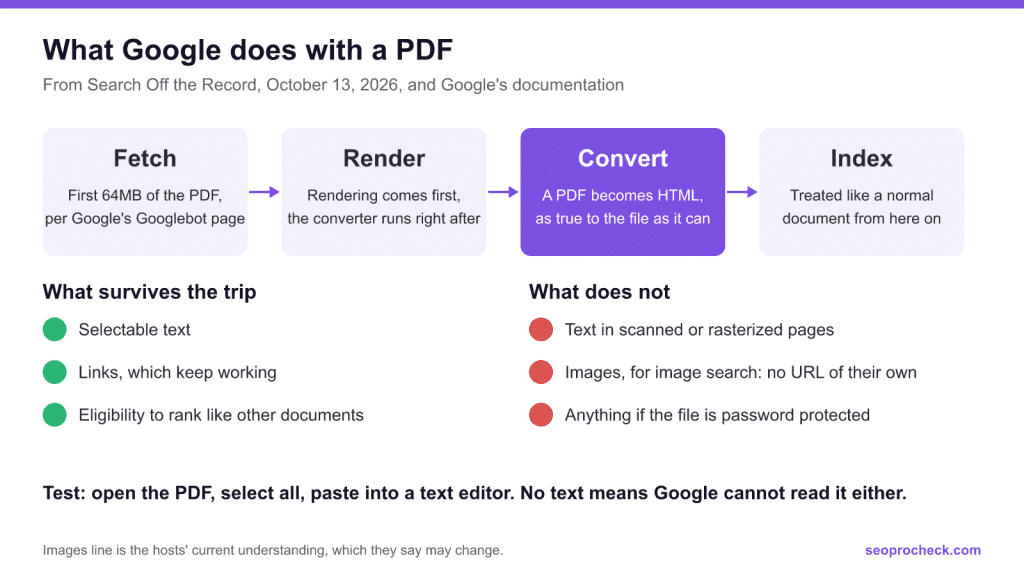
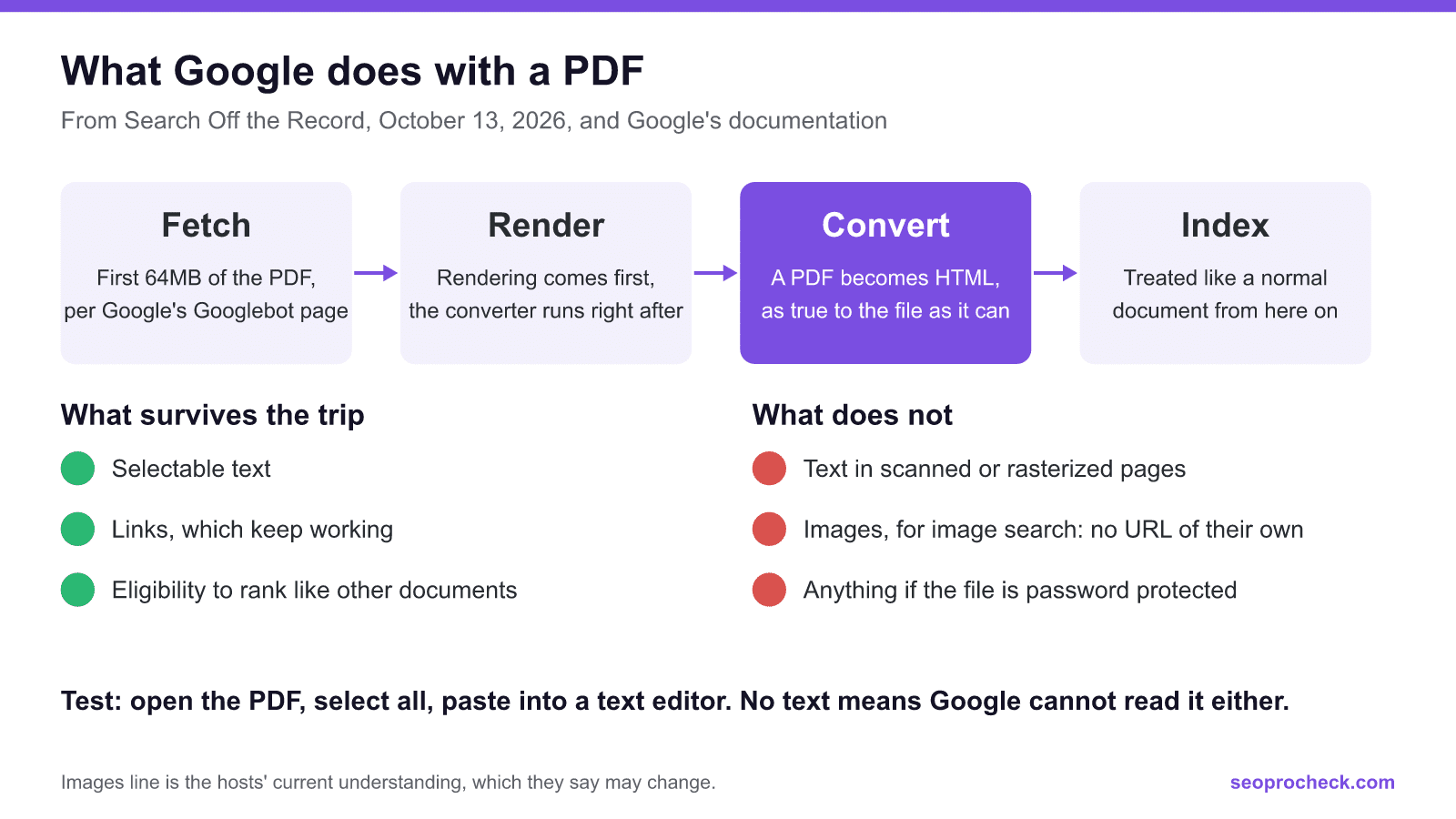
Google converts a PDF to HTML during indexing, so its text is indexed, its links work, and it can rank like any other document. That comes from John Mueller and Martin Splitt on Search Off the Record, October 13, 2026. The problems the hosts name are simpler: a scan with no real text, an old copy nobody refreshed, or a duplicate on another site.
- The quick test: open the PDF, select all, paste into a text editor. If no text appears, Google cannot read it either.
- Google's documentation says Googlebot reads the first 64MB of a PDF. The hosts did not know that figure on the podcast, so the limit is documented, even though they were unsure.
- As one host understands it, Google refreshes PDFs slowly. To get a changed PDF picked up, the hosts suggest a new file name.
- Images inside a PDF probably do not reach image search, since they have no URL of their own.
What happens to a PDF inside Google
The episode explains the pipeline. A PDF is a binary container, so it cannot be read as plain text. Right after rendering and before anything enters the index, a converter turns it into an HTML version as close as possible to the original, and most of the pipeline only ever sees that HTML. Google has converters for other formats too, such as rich text, document files and Excel sheets, and Google's file types page lists what it supports.
The captions have no speaker labels, so I credit the 2 hosts together. They were also careful about how sure they were, so here is what they said, with that hedge kept:
| Claim from the episode | How firmly they said it |
|---|---|
| A converter turns the PDF into HTML, after rendering and before indexing | Stated as how it works |
| Links in a PDF work | Stated. The reason given, that the converted page is treated like HTML, is framed as a guess |
| Indexing and ranking are much the same as any other document | Stated |
| An image inside a PDF may be noticed but is not processed for image search | Their current understanding, which might change or have changed |
| PDFs can appear in AI Overviews and AI Mode | Hedged at first, later stated more firmly for Google's own systems |
| Google recrawls PDFs less often, assuming they rarely change | One host's understanding |
| Very long PDFs may be hard to rank for one sentence, like a whole book on one HTML page | Their guess |
| Other AI systems use PDFs too | One host has seen them cited, and assumes the rest |
The size limit is documented
It is easy to come away from this episode thinking Google's PDF limit is undocumented. One host said: "I don't know the specific limit for PDF files." They also said Google is not keen on documenting limits, since people keep repeating old numbers, and that a limit could rise if large PDFs became common.
But Google has documented it. The Googlebot page, last updated February 3, 2026, says Googlebot crawls the first 2MB of a supported file type and the first 64MB of a PDF when crawling for Google Search. Beyond the limit, it stops the fetch and sends what it has for indexing. The limit applies to uncompressed data.
| What is being fetched | Limit Google documents | Source |
|---|---|---|
| PDF, by Googlebot for Google Search | First 64MB | Googlebot page |
| Other supported file types, by Googlebot for Google Search | First 2MB | Googlebot page |
| Files by Google's crawlers and fetchers in general | First 15MB by default; projects can set their own | Crawlers overview |
| Googlebot Video and Googlebot Image | May differ | Googlebot page |
Read October 31, 2026. Treat these as today's numbers. The hosts' point stands: they can change.
Note what the hosts said about the HTML side, though: fetching a PDF and handling its HTML representation may have separate limits, and they did not know where those sit. So 64MB is the fetch limit. It does not promise that page 500 of a long report gets used. If a sentence matters, do not bury it there.
What goes wrong with PDFs
| Problem | Why it matters | What to do |
|---|---|---|
| Scanned or rasterized pages | The pages are images, so there is no text to index. OCR cannot be relied on, and screen readers struggle too | Run the select-all test. Re-export from the source file with real text |
| One huge PDF | Hard to tell whether it should rank for one sentence or for the whole book | My suggestion: split long documents into chapters, or publish an HTML version |
| Copies on other sites | A PDF copy is a byte-for-byte duplicate, so canonicalization gets harder | Send a rel=canonical Link header, link to your site from the top of the PDF, and fill in the metadata |
| An update nobody sees | As one host understands it, Google assumes these files rarely change and refreshes them less often | Use a new file name and link to it. My addition: redirect the old URL to the new one |
| Auto-generated print copies of pages | The old PDF and the new HTML compete, and drift out of sync | Keep fresh or dynamic PDFs out of the index with noindex |
| Password protection | Search engines cannot read the content | Use it only when you want the PDF unreadable to them |
| Phones | The whole file downloads before anything shows, and zoomed text may not reflow | My suggestion: use HTML for anything people read on a phone |
Caching came up too: the hosts suggest setting HTTP caching to match how often the file really changes, for example a couple of months for a quarterly catalog.
The headers, in practice
A PDF has no <head>, so both signals go in the HTTP response. Google's canonical page says the HTML link element only works for HTML pages, and that a rel=canonical Link header covers files such as PDFs. Its robots page says to use X-Robots-Tag to block indexing of non-HTML files. These are my examples of those 2 rules:
# Apache: point a PDF at the HTML page that should rank
<Files "white-paper.pdf">
  Header set Link "<https://www.example.com/white-paper/>; rel=\"canonical\""
</Files>

# Apache: keep a PDF out of the index
<Files "old-price-list.pdf">
  Header set X-Robots-Tag "noindex"
</Files>

# Nginx equivalents
location = /white-paper.pdf {
  add_header Link "<https://www.example.com/white-paper/>; rel=\"canonical\"";
}
location = /old-price-list.pdf {
  add_header X-Robots-Tag "noindex";
}
One trap: Google says rules in the header are only found when the URL is crawled. So if robots.txt blocks a PDF, a noindex header on it will never be seen. Pick one. More detail is in my references on meta robots and X-Robots-Tag, canonical tags and robots.txt.
PDF or HTML?
| Situation | What the hosts lean toward |
|---|---|
| Forms, or layouts that must print exactly | PDF is a good fit |
| Restaurant menu, and HTML would take real effort | A PDF beats having no menu online |
| Restaurant menu, and copying it into your CMS is easy | HTML: it zooms, reflows and loads faster on a phone |
| The same content exists in both | HTML makes everything a bit easier |
| Content that changes often | HTML, and keep any generated PDF out of the index |
| A page people might want to save | You need not offer a PDF: browsers can already save a page as one |
A word on llms.txt, which opened the episode: the hosts see no sense in saving it as a PDF, since the whole idea of that file is the simplest possible form.
A short audit for a site with PDFs
- List your PDFs with a crawl of your own site. Google's file types page also documents the filetype: operator for a rough check.
- Note any over 64MB, measured uncompressed. One host assumes the limit is large enough for most PDFs.
- Run the select-all test on a sample, starting with scans and older files.
- Decide for each PDF: should this rank, or should an HTML page rank instead? Add the canonical header or noindex to match.
- Check the first page: is there a normal link back to your site, and are author, title and description filled in?
- Check for out-of-date copies still indexed, and see how they show in the Page indexing report.
FAQ
Can a PDF rank in Google?
Yes. In the October 13, 2026 Search Off the Record episode, the hosts say indexing and ranking work much like any other document, because the PDF is converted to HTML during indexing.
Do links in a PDF count?
They said links in a PDF work, and one host tied that to the file being converted to an HTML page. They did not put a value on those links, so I would not either.
Does Google index images inside a PDF?
The hosts' current understanding is that Google may notice an image inside a PDF but cannot process it like a normal image for image search, because it has no URL of its own. They also said this might change or might already have changed.
How big can a PDF be for Google?
Google's Googlebot page says it crawls the first 64MB of a PDF for Google Search, measured on uncompressed data, and sends what it downloaded on for indexing. The hosts said on the podcast that they did not know the figure, and that any limit can change.
Can PDFs appear in AI Overviews and AI Mode?
Asked directly on the podcast, one host said he would think so, because internally it is a normal HTML page, and later in the episode they say PDFs work for this at Google. Treat it as likely and not as a documented guarantee.
Should llms.txt be saved as a PDF?
No. The hosts rejected the idea, because the point of that file is to be as simple as possible and a PDF is not. They added that there is no enforcement, it just does not make much sense.
Sources I read
- Google: Search Off the Record, PDFs in Search. October 13, 2026. I read the published captions, which have no speaker labels.
- Google: How Googlebot accesses your site. Last updated February 3, 2026.
- Google: overview of Google crawlers and fetchers. Last updated June 12, 2026.
- Google: file types Google can index. Last updated February 3, 2026.
- Google: specify a canonical
- Google: robots meta tag and X-Robots-Tag
Take this with you
The assistant links open with a question about this page already written.
Claude Vincent is a technical SEO consultant focused on crawlability, rendering, and AI-search visibility. He writes the field guides and case studies at SEO ProCheck, with a bias toward the durable, unglamorous work that decides whether search engines and AI answer engines can actually read and cite a site.
About SEO ProCheck
Technical SEO consulting and GEO strategy with 20 years of enterprise experience. Case studies, resources, and tools for search and AI visibility.
Subscribe to our newsletter!
Recent Posts
- What's Actually Happening With AI Search, and What You Can Honestly Measure November 16, 2026
- Reddit Voice-of-Customer Analysis, Free and Without an API Key November 14, 2026
- Locked Out of Search Console? Verify Again With a New Account November 12, 2026