

AI Summary
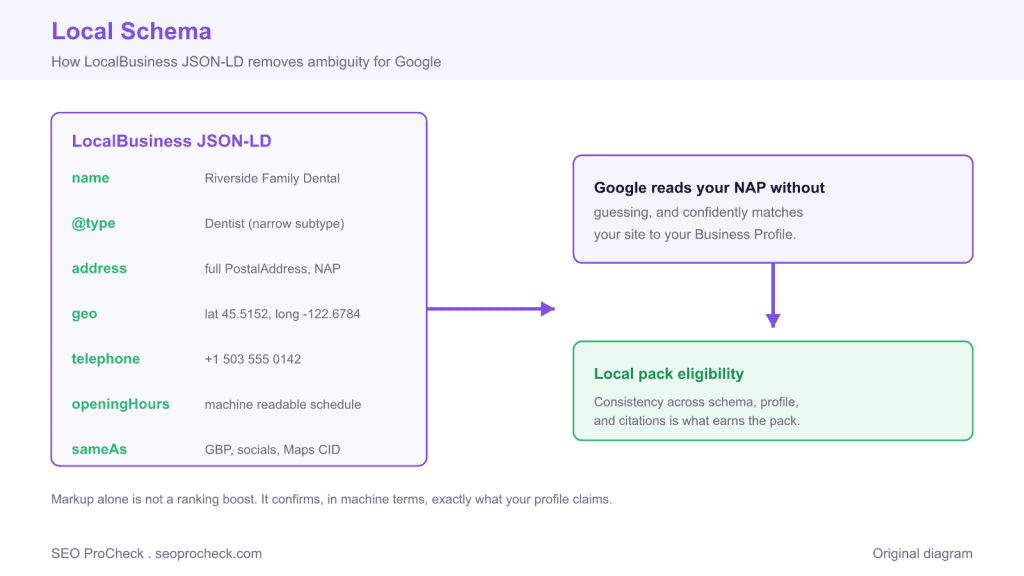
Local schema is the LocalBusiness JSON-LD markup that states your business name, address, geo coordinates, hours, phone, and profiles in a format search engines read without guessing. It does not rank you on its own, but it removes the ambiguity that keeps Google from confidently matching your site to your Business Profile.
- Use the narrowest matching type, such as Dentist or Plumber, instead of the generic LocalBusiness.
- Copy your NAP character for character from your Google Business Profile so schema, footer, and citations agree.
- Include real geo coordinates and a sameAs array that points at your live profiles and Maps CID.
- Validate with Google's Rich Results Test and refresh the markup the same day any detail changes.
What local schema is
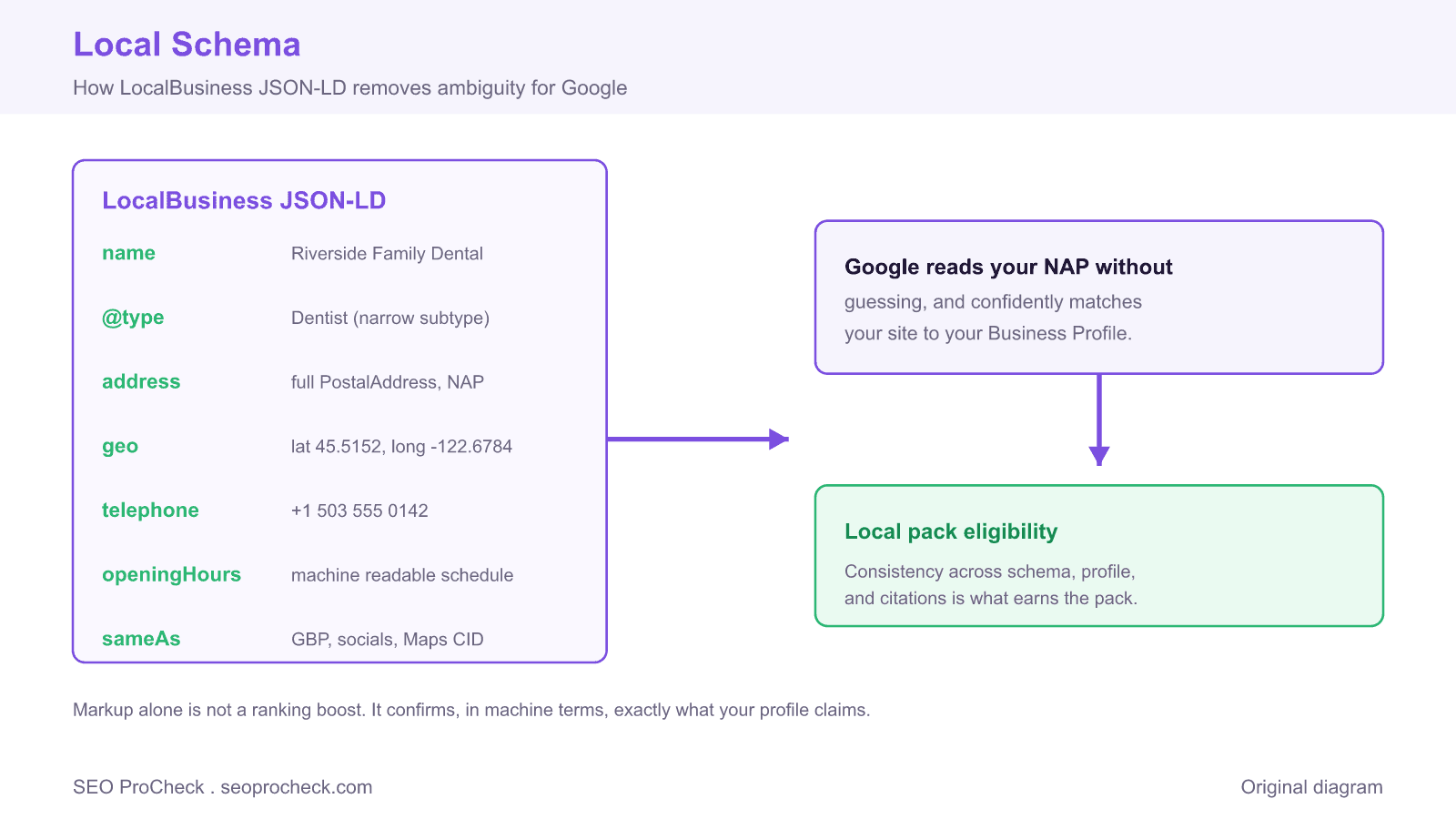
Local schema is the structured-data markup, almost always LocalBusiness JSON-LD, that spells out your business's name, address, geo-coordinates, hours, phone, and profiles in a format search engines read without guessing. Get it right and you hand Google a clean, machine-readable version of your NAP; get it wrong or skip it, and you're relying on Google to scrape your footer correctly, which it often doesn't.
It won't single-handedly rank you, but it removes ambiguity, and ambiguity is what keeps a business out of the local pack when Google can't confidently match your site to your Google Business Profile.
A real LocalBusiness JSON-LD block
Here's a complete, valid block you can adapt. Drop it in the <head> or anywhere in the page body. Replace the values; keep the structure.
<script type="application/ld+json">
{
  "@context": "https://schema.org",
  "@type": "Dentist",
  "@id": "https://www.example.com/#business",
  "name": "Riverside Family Dental",
  "image": "https://www.example.com/img/storefront.jpg",
  "url": "https://www.example.com",
  "telephone": "+1-503-555-0142",
  "priceRange": "$$",
  "address": {
    "@type": "PostalAddress",
    "streetAddress": "418 SW River Street",
    "addressLocality": "Portland",
    "addressRegion": "OR",
    "postalCode": "97201",
    "addressCountry": "US"
  },
  "geo": {
    "@type": "GeoCoordinates",
    "latitude": 45.5152,
    "longitude": -122.6784
  },
  "openingHoursSpecification": [
    {
      "@type": "OpeningHoursSpecification",
      "dayOfWeek": ["Monday","Tuesday","Wednesday","Thursday"],
      "opens": "08:00",
      "closes": "17:00"
    },
    {
      "@type": "OpeningHoursSpecification",
      "dayOfWeek": "Friday",
      "opens": "08:00",
      "closes": "13:00"
    }
  ],
  "sameAs": [
    "https://www.facebook.com/riversidefamilydental",
    "https://www.instagram.com/riversidefamilydental",
    "https://www.google.com/maps?cid=REAL_CID_HERE"
  ]
}
</script>
Two things people miss: use the most specific type available (Dentist, Plumber, Restaurant) rather than the generic LocalBusiness when one exists, and make sameAs point at your real, live profiles, including your Google Maps CID, because that's how you tie the markup to the profile. For a full property-by-property reference, see the LocalBusiness Schema guide.
Which properties earn their place
| Property | Required? | Why it matters |
|---|---|---|
name, address, telephone | Effectively yes | Your NAP, must match your profile and citations exactly |
@type (specific) | Yes | Tells Google what kind of business; use the narrowest matching type |
geo (lat/long) | Strongly recommended | Pins the exact location; use the geo-coordinate finder to get precise values |
openingHoursSpecification | Recommended | Machine-readable hours; keep in sync with the profile |
sameAs | Recommended | Links the entity to your GBP, social, and Maps CID |
image, priceRange, url | Optional but useful | Fills out the entity and improves confidence |
@id | Recommended | A stable URI so other schema on the site can reference this entity |
How to add and validate it
- Pick the right type. Check schema.org for a subtype of
LocalBusinessthat fits (Dentist,HVACBusiness,Attorney). Fall back toLocalBusinessonly if nothing narrower exists. - Pull your exact NAP. Copy name, address, and phone character-for-character from your Google Business Profile so the markup, the profile, and your citations all agree.
- Get real coordinates. Don't eyeball lat/long, grab the precise values for your entrance.
- Add the JSON-LD to the relevant page, homepage for a single location, each location page for multi-location. One block per physical location.
- Validate. Run it through Google's Rich Results Test and the Schema.org validator. Fix every error and warning before you ship.
- Recheck after any change. New hours, moved office, new phone, update the schema the same day you update the profile. Drift here is a silent trust-killer.
Common mistakes (and the fix)
- NAP in the schema doesn't match the profile. "Street" in one, "St." in the other. Fix: copy NAP verbatim from the profile into every surface, schema, footer, citations.
- Using generic
LocalBusinesswhen a specific type exists. Fix: always use the narrowest matching subtype; it gives Google more to work with. - Fake or omitted geo-coordinates. Rounding or leaving out
geoweakens the location signal. Fix: use precise, real coordinates for the actual entrance. - Empty or wrong
sameAs. Linking to a dead social profile or skipping the Maps CID wastes the entity-linking benefit. Fix: verify every URL is live and include the real Google Maps CID. - Marking up hours that are wrong. Schema hours that contradict the profile confuse the "open now" logic. Fix: keep
openingHoursSpecificationin lockstep with the profile, holidays included.
Where local schema fits in the stack
Schema is the on-site backbone of your local presence: it confirms, in machine terms, what your Business Profile claims and what your NAP shows in your footer. It works alongside your Google Posts and Q&A on the profile side, and it's reinforced off-site by local link building that repeats your name and address consistently. None of these ranks you alone; consistency across all of them is what earns the pack. For hands-on implementation of JSON-LD in general, the JSON-LD implementation guide is the deeper resource.
FAQ
Does local schema improve my rankings by itself?
Not directly. It clarifies and confirms your business details so Google can confidently match your site to your profile and location. That clarity supports rankings; the markup alone isn't a ranking boost.
Should I use LocalBusiness or a more specific type?
Always the more specific type when one exists, Dentist, Restaurant, Plumber. It tells Google exactly what you are. Only fall back to plain LocalBusiness when no subtype fits.
Where do I put the JSON-LD?
On the page that represents the location, homepage for a single-location business, each dedicated location page for multi-location. One block per physical address, and keep every block's NAP consistent.
Do I need geo-coordinates if I already have the address?
You should include them. The address is human-readable; the geo block pins the exact point, which strengthens the location signal, especially in dense areas where addresses cluster.
How do I know my schema is valid?
Run it through Google's Rich Results Test and the Schema.org validator. Clear every error and warning. Then spot-check it again any time your hours, address, or phone change, stale schema is worse than none because it actively contradicts your profile.
Take this with you
The assistant links open with a question about this page already written. Nothing is sent until you press enter.
Claude Vincent is a technical SEO consultant focused on crawlability, rendering, and AI-search visibility. He writes the field guides and case studies at SEO ProCheck, with a bias toward the durable, unglamorous work that decides whether search engines and AI answer engines can actually read and cite a site.
About SEO ProCheck
Technical SEO consulting and GEO strategy with 20 years of enterprise experience. Case studies, resources, and tools for search and AI visibility.
Work With Me
Technical SEO audits, GEO strategy, site migrations, and international SEO. Hourly consulting for teams who need hands-on support, not just reports.
Subscribe to our newsletter!








Recent Posts
- Most Top Sites Never Say Who They Are in Structured Data October 14, 2026
- Homepage Titles Are Mostly Too Short, Not Too Long October 8, 2026
- Who Actually Serves an llms.txt? 184 Top Sites Measured September 29, 2026